
Shuffle allows you to register, verify your identity, enable security features, and access online casino games and sports betting through a structured account creation process that follows defined compliance and security standards.
Below, you will find a complete, guide for Shuffle registration, sign up requirements, account verification tiers, referral codes, and two-factor authentication setup, structured for users who want to create an account and start playing without delays.
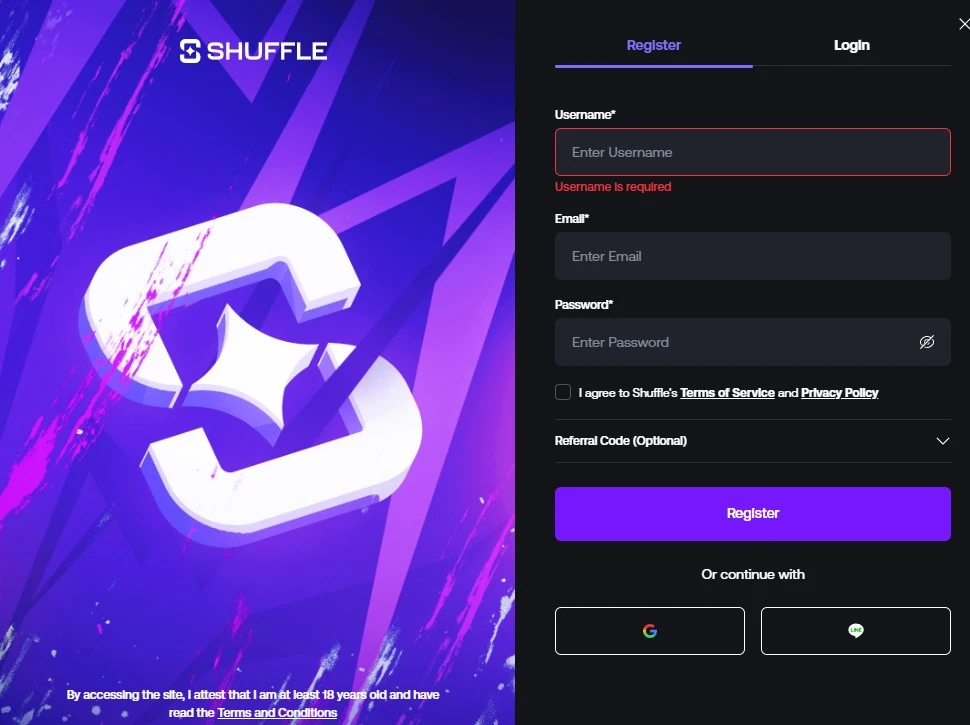
How Do You Register a New Account on Shuffle?
You register on Shuffle by clicking the “Register” button, entering a username, email address, and password, or by using an existing Google account or LINE account for faster onboarding.
What Information Do You Need for Shuffle Sign Up?
Shuffle requires:
- Username → Must be unique
- Email address → Must be valid and accessible
- Password → Must meet security criteria
- Referral code (optional) → Must be entered during registration if applicable
What Are the Password Requirements?

Shuffle enforces specific password rules to protect account integrity:
- Must contain 8–24 characters
- Must include at least one letter
- Must include at least one number
The system validates these conditions before allowing you to complete your account creation, which reduces unauthorized access risks.
If you already use Google or LINE, you can choose the alternative sign-up method and complete registration without manually setting a password during the initial step.
Shuffle App Registration – Sign Up and Play on Mobile
The Shuffle mobile app provides a convenient way to register, verify, and start playing directly from your smartphone or tablet, ensuring that you never miss an opportunity to participate in casino games or sports betting while on the go; by downloading the app, you can create a new account in just a few steps, set a secure password, enter a referral code if available, and immediately deposit funds to start playing, making your first experience both fast and rewarding. The app also supports two-factor authentication, promotional offers, and easy account management, allowing you to claim bonuses, track rewards, and place bets anytime and anywhere, turning your mobile device into a complete, secure, and fully functional gaming platform.

Shuffle Login – Secure Access to Your Account
Logging into your Shuffle account is fast and secure, allowing you to start playing your favorite casino games or place sports bets immediately after entering your username or email and password, or by using your Google or LINE credentials for a faster experience; this streamlined login process ensures that you can access your funds, claim ongoing promotions, and participate in live events without any delays, giving you full control over your account at all times. Additionally, once logged in, you can easily manage your profile, update personal information, and review transaction history, which allows you to deposit, withdraw, and track your gameplay safely and efficiently.
How Does Shuffle Email Verification Work After Registration?
Shuffle sends a verification link to the email address you provided during sign up, and you must click that link to activate your account before accessing full platform features.
Email verification confirms:
- Ownership of the email address
- Account authenticity
- Communication reliability for security alerts
Without email confirmation, you cannot proceed to higher verification levels or withdrawals.

What Are Shuffle Verification Tiers (KYC Levels)?
Shuffle applies a tier-based identity verification system that aligns with compliance requirements and anti-money laundering standards.
To access verification, go to:
Profile → Settings → Verify
Level 1 – Basic Information Verification
You must submit:
- Full legal name
- Date of birth
- Residential address (City, Country, Postal Code)
- Occupation
This level establishes your personal identity within the system.
Level 2 – Identity Verification (Government ID)
You must upload one government-issued document:
- Passport
- National ID card
- Driving license
- Residence permit
Shuffle reviews the document to confirm identity authenticity.
Level 3 – Proof of Address Verification
You must submit official proof of residence, such as:
- Bank statement
- Utility bill (electricity, water, gas, internet)
- Government correspondence
- Signed lease agreement
- Credit card statement
- Employer residence certificate
- Property purchase deed
Documents must show your name and address clearly.
Higher verification levels enable smoother withdrawals and enhanced account trust status.

How Do You Set Up Two-Factor Authentication (2FA) on Shuffle?
You enable 2FA by navigating to:
Profile → Settings → Security → Enable
Shuffle will:
- Send a verification code to your registered email
- Display a QR code for scanning
- Require connection with an authenticator app
Supported authenticator apps include:
- Google Authenticator
- Authy
Once activated, 2FA becomes mandatory for:
- Future logins
- Withdrawals
- Tipping and rain features
Two-factor authentication adds a second verification layer beyond your password, reducing account takeover risk.
Can You Use a Referral Code During Shuffle Registration?
Yes, you can enter a referral code during sign up if you did not use a referral link.
Important conditions:
- Referral codes cannot be modified after registration
- Incorrect entries cannot be corrected later
- Policies apply according to Shuffle’s referral terms
If you want to claim referral-based benefits, you must apply the code during the account creation process.
What Happens After You Complete Shuffle Registration?
After completing:
- Account creation
- Email verification
- Required KYC levels
- Optional 2FA setup
You can:
- Deposit funds
- Access online casino games
- Place sports bets
- Withdraw winnings (subject to verification status)
Shuffle structures the onboarding flow to move users from registration to active gameplay in a step-by-step, compliance-focused manner while maintaining defined security controls.