
Shuffle Payments manages cryptocurrency deposits and withdrawals for users who interact with the Shuffle platform. The payment infrastructure integrates multiple blockchain networks, enabling players to transfer digital assets securely while maintaining transaction transparency through public ledgers.
Shuffle relies on blockchain confirmations, wallet address verification, supported network compatibility, and internal security policies to process all transactions. These mechanisms reduce transaction errors, prevent misuse of payment systems, and ensure accurate balance updates for user accounts.
Understanding supported assets, deposit procedures, withdrawal processing, vault storage, and transaction policies helps users avoid errors and manage funds efficiently on the platform.
What Assets Does Shuffle Support for Deposits and Withdrawals?
Shuffle supports a diverse set of cryptocurrencies and blockchain networks to allow users flexible deposit and withdrawal options. The platform integrates major blockchain ecosystems such as Bitcoin, Ethereum, Solana, Tron, and Polygon, which collectively represent a large portion of global cryptocurrency transaction volume.
Additionally, Shuffle includes several stablecoins and ecosystem tokens to support faster transactions, reduced volatility exposure, and compatibility with decentralized finance wallets. Because blockchain networks operate independently, Shuffle requires users to match both the correct cryptocurrency and the correct blockchain network before sending funds.
Incorrect network selection represents one of the most common causes of lost deposits across cryptocurrency platforms. Therefore, Shuffle strictly processes only supported assets that arrive on supported chains, while unsupported transfers cannot always be recovered.
The platform regularly expands its asset compatibility to align with evolving blockchain adoption and user demand. However, users must always verify network compatibility before initiating a transfer because blockchain transactions remain irreversible once confirmed.
Supported Cryptocurrencies on Shuffle
| Asset | Supported Networks |
|---|---|
| Bitcoin (BTC) | Bitcoin |
| Ethereum (ETH) | Ethereum, BEP20, Base |
| SHFL | ERC20 |
| Litecoin (LTC) | Litecoin |
| USDT | ERC20, BEP20, TRC20, Polygon, Solana |
| USDC | ERC20, BEP20, Solana, Polygon, Base, Arbitrum |
| Tron (TRX) | Tron |
| Polygon (POL) | Polygon, Ethereum |
| Ripple (XRP) | XRP Ledger |
| Solana (SOL) | Solana |
| Dogecoin (DOGE) | Dogecoin |
| Binance Coin (BNB) | BNB Chain |
| Avalanche (AVAX) | Avalanche |
| Toncoin (TON) | TON Network |
| Shiba Inu | ERC20 |
| Bonk | Solana |
| dogwifhat (WIF) | Solana |
| TRUMP | Solana |
| PUMP | Solana |
| DAI | ERC20 |
Important Deposit Restriction
Shuffle processes only supported cryptocurrencies sent through supported networks. Deposits sent using unsupported tokens, incorrect chains, or incompatible smart contract addresses may become unrecoverable depending on blockchain compatibility and wallet infrastructure.
Special Rule for USDC on Arbitrum
Shuffle supports USDC on Arbitrum exclusively through a specific verified contract address. This restriction prevents issues caused by unofficial token contracts or bridged assets that do not match the platform’s wallet configuration.
0xaf88d065e77c8cc2239327c5edb3a432268e5831
Using any other contract address when sending USDC on Arbitrum may result in a failed or lost deposit because the system recognizes only the supported contract instance.
In the next section, the deposit process explains how users transfer supported assets to their Shuffle wallet safely.
How Do You Make a Deposit on Shuffle?
Depositing cryptocurrency on Shuffle involves a short verification process followed by a blockchain transfer to a generated wallet address. The platform uses a verification step to ensure account ownership, prevent automated abuse, and comply with internal security controls.
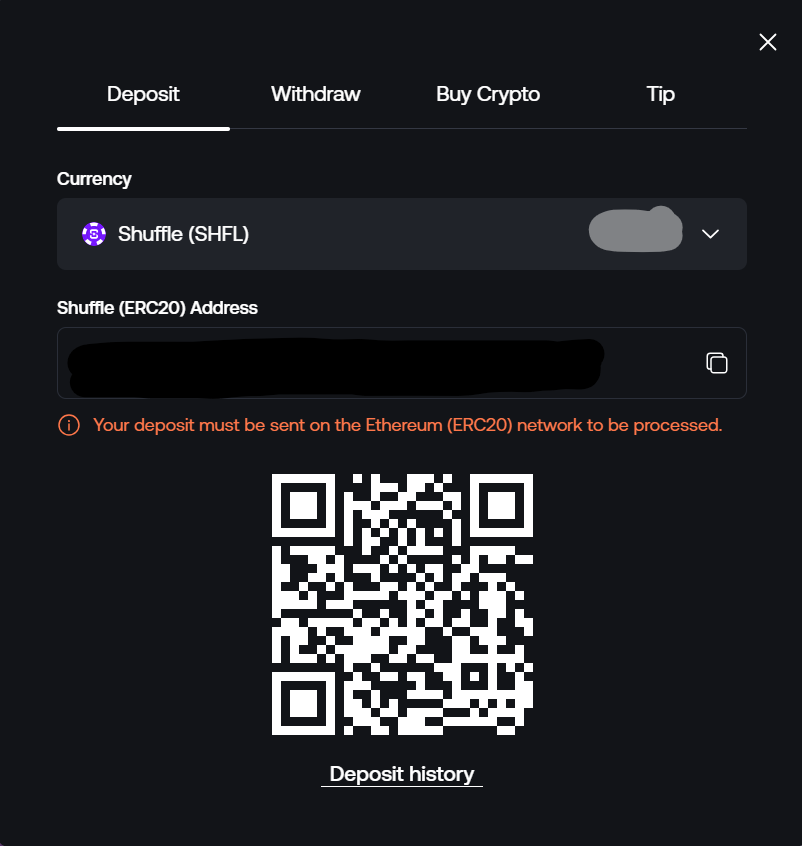
After verification, users can access their deposit interface where the platform generates wallet addresses for supported assets. Each deposit address corresponds to a specific cryptocurrency and blockchain network, which means users must carefully match the selected network with the sending wallet configuration.
Because blockchain transactions cannot be reversed once confirmed, verifying the correct network and asset type remains the most important step during the deposit process. Even small network mismatches can prevent the platform from detecting incoming transactions.
Moreover, some blockchains require additional identifiers beyond the wallet address to route transactions correctly. These identifiers ensure the deposit reaches the intended user account within the platform’s shared wallet infrastructure.
Deposit Process
- Complete email verification for your account.
- Complete Level 1 identity verification.
- Open the wallet deposit section.
- Select the cryptocurrency you want to deposit.
- Confirm the blockchain network associated with your wallet.
- Send funds to the generated deposit address.
Important Deposit Rules
- Verify the cryptocurrency before sending funds.
- Match the blockchain network used by your wallet.
- Send funds only to the generated deposit address.
- Confirm additional identifiers when required.
XRP and TON Deposit Requirement
Some blockchains rely on additional identifiers to route funds internally across shared wallet systems. Shuffle therefore requires users to include these identifiers when sending specific assets.
| Asset | Required Field |
|---|---|
| XRP | Destination Tag |
| TON | Memo |
Without the required destination tag or memo, the system may receive the transaction but cannot automatically link it to the correct user account.
After initiating a deposit, users typically monitor confirmation progress through the blockchain network. The next section explains how long deposits usually take to appear in a Shuffle wallet.
How Long Do Shuffle Deposits Take?
Shuffle credits deposits after the blockchain network confirms the transaction and the platform’s wallet infrastructure detects the confirmed transfer. Because every blockchain uses different block times and confirmation thresholds, the waiting period may vary depending on the asset used.
For example, Bitcoin confirmations typically require several minutes due to its block interval of approximately ten minutes, whereas networks such as Solana or Tron process blocks significantly faster. Shuffle waits until the required confirmation threshold completes before crediting the funds to a user’s balance.
Additionally, different wallets or exchanges may apply their own confirmation requirements before broadcasting the transaction fully across the blockchain network. These variations explain why deposit times sometimes differ between users even when sending the same cryptocurrency.
Users can always verify transaction progress by reviewing blockchain explorers, which display confirmation counts and network activity in real time.
Typical Confirmation Requirements
- Some wallets require 1 blockchain confirmation.
- Others require 3 or more confirmations.
- High-traffic networks may temporarily delay confirmations.
Users can monitor their incoming transactions through the official deposit history page.
Deposit tracking page:
https://shuffle.zone/transactions/deposits
While deposits usually process automatically, mistakes occasionally occur. The next section explains how Shuffle handles incorrect or misrouted deposits.
What Happens If You Send a Wrong Deposit?
Wrong deposits can occur when users send unsupported assets, select incorrect blockchain networks, omit required identifiers, or transfer funds to incompatible wallet formats. These errors occur across many cryptocurrency platforms because blockchain transactions do not include built-in reversal mechanisms.
Shuffle investigates incorrect deposits individually through its support team. However, successful recovery depends heavily on whether the platform controls the receiving wallet infrastructure and whether the blockchain network allows manual asset retrieval.
For supported assets sent through the wrong chain, recovery often requires manual wallet operations and security verification by the internal engineering team. Because this process consumes technical resources, the platform applies recovery policies and possible penalties depending on the situation.
Additionally, deposits must meet a minimum value requirement before the support team attempts recovery procedures. Small transactions often cannot justify the operational costs associated with manual blockchain recovery.
Minimum Retrieval Requirement
Wrong deposits must exceed $20 USD before the platform attempts recovery procedures.
Recovery Rules
| Scenario | Outcome |
|---|---|
| Supported coin but wrong chain | First recovery free |
| Repeated mistakes | 10% penalty (max $20) |
| Unsupported coin or network | Case-by-case investigation |
| Complex recovery process | Up to 50% penalty |
| Non-recoverable deposit | Funds cannot be credited |
Users who experience a wrong deposit must contact Shuffle support through the platform’s Live Chat system so the investigation process can begin.
Once funds appear in the wallet balance, users can proceed with withdrawals. The following section explains how withdrawal processing works.
How Do Withdrawals Work on Shuffle?
Shuffle processes withdrawals by broadcasting transactions directly to the relevant blockchain network after the user submits a withdrawal request. The system prepares the transaction, deducts applicable blockchain fees, and then sends the transaction to the network for confirmation.
Because blockchain systems operate without centralized reversal mechanisms, every withdrawal requires careful verification of the destination address before submission. Even a small error in a wallet address can redirect funds permanently to an unintended recipient.
Additionally, the withdrawal process depends on blockchain congestion and network fees at the moment of submission. Higher congestion levels may increase confirmation time or network costs depending on the blockchain used.
Shuffle therefore recommends verifying the destination wallet, network compatibility, and withdrawal amount carefully before completing the request.
Withdrawal Process
- Open the wallet section of your account.
- Select the withdrawal option.
- Choose the cryptocurrency you want to withdraw.
- Enter the destination wallet address.
- Enter the withdrawal amount.
- Confirm the withdrawal request.
Withdrawal Rules
- Blockchain transactions cannot be reversed after submission.
- Network fees are deducted from the withdrawal amount.
- Users must verify the wallet address before confirming.
Users can review their withdrawal activity through the official withdrawal history page.
Withdrawal history page:
https://shuffle.zone/transactions/withdrawals
To verify the progress of a withdrawal transaction, users often check the blockchain using a transaction identifier. The next section explains how this tracking works.
Where Can You Track Shuffle Withdrawals?
Shuffle assigns a unique blockchain transaction identifier, commonly called a TXID, to each processed withdrawal. This identifier allows users to track their transaction across the public blockchain ledger and verify when confirmations occur.
Block explorers function as searchable databases that display blockchain transaction records. By entering the TXID into a relevant explorer, users can view transaction timestamps, confirmation counts, sender addresses, receiver addresses, and network fees.
This transparency represents one of the fundamental characteristics of blockchain technology because every confirmed transaction becomes permanently recorded within the distributed ledger.
Withdrawal Tracking Process
- Open your withdrawal history page.
- Copy the transaction ID (TXID).
- Paste the TXID into the relevant blockchain explorer.
Examples of blockchain explorers include:
- Blockchain.com for Bitcoin transactions
- Etherscan for Ethereum and ERC-20 tokens
- Solscan for Solana transactions
While managing wallet balances and withdrawals, many users prefer to separate active gaming funds from stored balances. Shuffle provides a dedicated feature for this purpose called the Vault.
What Is the Shuffle Vault?
The Shuffle Vault functions as a protected storage balance that remains separate from the user’s active gaming wallet. This feature allows users to store cryptocurrency securely while preventing those funds from being used accidentally during gameplay.
Unlike the primary wallet balance, funds stored in the Vault remain inaccessible to games until the user manually transfers them back to the wallet. This separation helps users manage bankroll allocation, protect winnings, and maintain stricter financial control.
Additionally, the Vault requires password verification before funds can be moved out of storage. This extra authentication layer prevents unauthorized withdrawals if someone gains temporary access to a user’s account session.
Many users rely on the Vault feature to divide their funds into operational gaming balances and long-term stored balances. This approach mirrors traditional financial budgeting methods where users maintain separate spending and savings accounts.
Vault Characteristics
- Stores funds separately from the gaming wallet.
- Prevents stored funds from being used in bets.
- Requires password verification to unlock funds.
- Allows unlimited transfers between wallet and vault.
How to Access the Vault
- Open your Profile settings.
- Expand the account options menu.
- Select the Vault section.
Users can also review a detailed history of transfers between the wallet and the Vault.
How Do You Move Funds Between Wallet and Vault?
Shuffle allows internal transfers between the main wallet and the Vault without blockchain transactions. Because these transfers occur within the platform’s internal ledger, they process instantly without network fees.
Users commonly move funds into the Vault after finishing a gaming session to protect their remaining balance. Later, when they want to continue playing, they can transfer funds back into the wallet balance.
This flexible internal transfer system enables users to manage their balances dynamically without requiring repeated deposits or withdrawals from external wallets.
Vault Transfer Process
- Open the Vault page in your profile.
- Choose transfer direction:
- Wallet → Vault
- Vault → Wallet
- Enter the transfer amount.
- Confirm the transfer.
Security Requirement
Transfers leaving the Vault require the user to re-enter their account password, which adds a protective verification layer.
Although Shuffle provides flexible deposit and withdrawal functionality, certain financial behaviors remain restricted to protect platform integrity. The following section explains the platform’s policy regarding coin mixing.
Does Shuffle Allow Coin Mixing?
Shuffle does not allow coin mixing behavior because it conflicts with the platform’s financial security policies and transaction monitoring practices. Coin mixing refers to a pattern where users deposit funds and immediately withdraw them without meaningful gameplay activity.
This activity often resembles blockchain obfuscation techniques where funds move through multiple platforms to obscure their origin. To maintain operational transparency, Shuffle monitors transaction behavior and flags accounts that exhibit patterns associated with mixing services.
If a user deposits funds and attempts to withdraw them without placing normal gameplay bets, the system may mark the withdrawal request for manual review by the security team.
Coin Mixing Behavior Examples
- Depositing cryptocurrency and immediately withdrawing the same amount.
- Placing extremely small bets relative to the deposit value.
- Using the platform only as a transaction relay.
Possible Consequences
- Withdrawal request enters manual review.
- Security team investigates account activity.
- Processing delays may occur until the review completes.
Following platform payment policies helps users avoid delays, rejected withdrawals, and deposit complications.